What Is Cloud Storage and How Does It Work? (2026 Beginner’s Guide)
Published: 25 May 2026
Today, almost everything we do online involves data, photos, videos, documents, apps, and backups. But where does all this information actually go?
The answer is cloud storage.
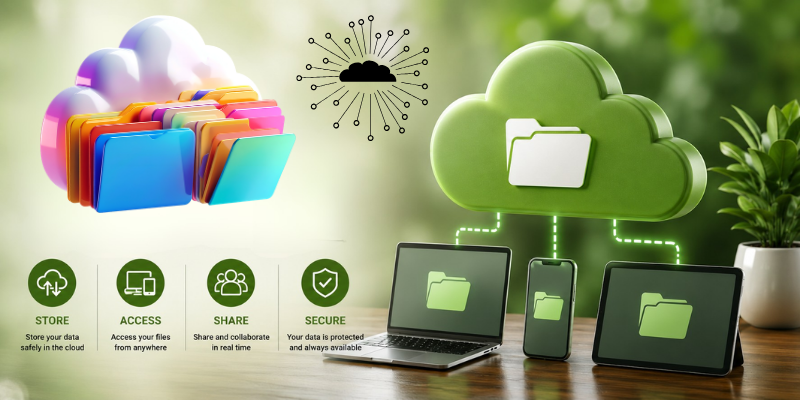
If you’ve ever uploaded files to Google Drive, saved photos on iCloud, or shared documents using Dropbox, then you’ve already used cloud storage.
But many people still ask:
- What is cloud storage?
- How cloud storage works?
- Is it safe?
- Is free cloud storage worth using?
In this ultimate beginner-friendly guide, we’ll explain everything in simple terms — including how online storage works, its advantages, disadvantages, security risks, and the best ways to use it in 2026.
What Is Cloud Storage? Quick Answer:
Cloud storage is a technology that allows users to store files and data on remote internet-based servers instead of saving them directly on a computer or phone.
Instead of keeping files only on your device, your data is stored in secure data centers managed by companies like Google, Microsoft, and Amazon.
You can access those files anytime using the internet.
📊 Cloud Storage vs Traditional Storage
| Feature | Cloud Storage | Traditional Storage |
|---|---|---|
| Access Anywhere | ✅ Yes | ❌ No |
| Internet Required | ✅ Usually | ❌ No |
| Automatic Backup | ✅ Yes | ❌ Limited |
| Storage Expansion | ✅ Easy | ❌ Hardware needed |
| Risk of Device Loss | ✅ Safer | ❌ Higher |
| Collaboration | ✅ Excellent | ❌ Limited |
How Cloud Storage Works
Understanding how cloud storage works is actually simpler than most people think.
When you upload a file to a cloud service:
- Your file is sent through the internet
- It reaches remote servers in data centers
- The provider stores and protects the file
- You can access it from any connected device
That means your files are no longer tied to one device.
For example:
- Upload a photo from your phone
- Open it later on your laptop
This is possible because the file exists on remote servers rather than local storage.
What Are Cloud Servers?
Cloud servers are powerful computers located inside massive data centers.
Companies like:
- Amazon
- Microsoft
operate huge global networks of servers that store billions of files daily.
These servers:
- Backup data automatically
- Protect files from hardware failure
- Keep files available 24/7
Types of Cloud Storage
There are several different types of cloud storage systems.
1. Public Cloud Storage
This is the most common type used by everyday users.
Examples:
- Google Drive
- Dropbox
- Microsoft OneDrive
✅ Best For:
- Students
- Freelancers
- Personal backups
2. Private Cloud Storage
Private cloud storage is designed for businesses and organizations that need more control and security.
✅ Best For:
- Enterprises
- Government systems
- Sensitive business data
3. Hybrid Cloud Storage
A hybrid cloud combines both public and private systems.
Businesses often use hybrid storage for:
- Better flexibility
- Lower costs
- Enhanced security
Why Cloud Storage Is So Popular
Cloud storage continues growing because it solves major modern problems.
1. Access Files Anywhere
One of the biggest advantages is flexibility.
You can access your files from:
- Phones
- Tablets
- Laptops
- Smart TVs
This is why cloud systems are essential for remote work.
2. Automatic Backup
Cloud storage automatically protects your files.
If your laptop breaks or your phone gets stolen, your files remain safe online.
3. Easy Collaboration
Cloud platforms make teamwork incredibly simple.
Services like Google Drive allow multiple people to edit the same document simultaneously.
4. Cost-Effective Storage
Instead of buying expensive hard drives repeatedly, users can upgrade cloud storage when needed.
This flexibility makes cloud systems affordable.
Is Cloud Storage Safe?
This is one of the most searched questions online.
The answer: Mostly yes, if you use trusted providers.
Top platforms use:
- Encryption
- Security monitoring
- Multi-factor authentication
- Backup systems
Popular secure services include:
- MEGA
- Sync.com
- Google Drive
Common Cloud Storage Security Risks
Although cloud storage is generally secure, users still make dangerous mistakes.
🚫 Common Risks:
- Weak passwords
- Sharing files publicly
- Using fake cloud apps
- Ignoring two-factor authentication
🔥 Pro Tip:
Always enable:
✅ Two-factor authentication
✅ Strong passwords
✅ Backup recovery options
☁️ Best Cloud Storage Services in 2026
Here are some of the top cloud storage platforms today.
| Service | Free Storage | Best Feature |
|---|---|---|
| Google Drive | 15GB | Productivity integration |
| MEGA | 20GB | Strong encryption |
| Dropbox | 2GB | File sharing |
| OneDrive | 5GB | Windows integration |
| pCloud | 10GB | Speed & simplicity |
If you want more recommendations, check:
👉 Best Free Cloud Storage Options
Free vs Paid Cloud Storage
One of the biggest questions users ask is whether free storage is enough.
Free Cloud Storage
✅ Great for casual users
✅ Good for students
✅ No upfront cost
Paid Cloud Storage
✅ More storage
✅ Better collaboration tools
✅ Business features
✅ Enhanced security
For a deeper comparison, see:
👉 Free vs Paid Cloud Storage
How to Get More Free Cloud Storage
Many users don’t realize you can increase your storage without paying.
Some legit methods include:
- Referral programs
- Combining multiple services
- Promotional offers
Want to learn how?
👉 How to Get 100GB Free Cloud Storage
Cloud Storage vs Cloud Backup
People often confuse these two terms.
Cloud Storage
Used for:
- File syncing
- Sharing
- Accessing files anywhere
Cloud Backup
Focused on:
- Disaster recovery
- Full-device protection
- Restoring lost data
📱 Real-Life Uses of Cloud Storage
Cloud storage is everywhere today.
📸 Photos & Videos
Apps automatically sync your media online.
💼 Business Files
Teams collaborate remotely using shared storage.
🎓 Student Work
Assignments and notes stay accessible everywhere.
🎮 Gaming
Game saves and settings sync across devices.
Common Mistakes Beginners Make
Many new users misuse cloud storage.
🚫 Avoid These Mistakes:
- Storing everything in one platform
- Ignoring backups
- Using weak passwords
- Uploading sensitive files without encryption
Expert Tips for Using Cloud Storage Efficiently
✅ Organize Files Properly
Create folders for:
- Work
- Personal
- Photos
- Backups
✅ Use Multiple Services
Different services have different strengths.
Example:
- Photos → Google Photos
- Documents → Google Drive
- Sensitive files → MEGA
✅ Clean Unused Files Regularly
Old files waste storage space quickly.
Why Cloud Storage Matters for the Future
As technology advances, cloud storage is becoming even more important.
Future trends include:
- AI-powered cloud management
- Faster syncing speeds
- Better encryption
- More remote collaboration
Cloud systems are now essential infrastructure for both individuals and businesses.
Final Verdict
Cloud storage has completely transformed how people store and access data.
Instead of relying only on physical devices, users can now:
✅ Access files anywhere
✅ Share documents instantly
✅ Protect data from device failure
✅ Scale storage easily
Whether you’re a student, business owner, creator, or casual user, understanding what cloud storage is and how it works is becoming essential in the digital world.
And as cloud technology continues evolving, its importance will only grow stronger.
Cloud storage is a service that stores your files online instead of only on your device.
Cloud storage works by uploading files through the internet to remote servers where they are stored securely and accessed anytime.
Many services offer free plans, including Google Drive and MEGA.
Major advantages include:
- Accessibility
- Automatic backup
- File sharing
- Collaboration
- Scalability
Yes, trusted providers use encryption and security systems to protect user data.





- Be Respectful
- Stay Relevant
- Stay Positive
- True Feedback
- Encourage Discussion
- Avoid Spamming
- No Fake News
- Don't Copy-Paste
- No Personal Attacks
- Be Respectful
- Stay Relevant
- Stay Positive
- True Feedback
- Encourage Discussion
- Avoid Spamming
- No Fake News
- Don't Copy-Paste
- No Personal Attacks
