Is Free Cloud Storage Safe? Security Risks Explained
Published: 26 May 2026
Cloud storage has become part of everyday life. From storing photos and documents to backing up sensitive work files, millions of people rely on free cloud services every day.
But one important question keeps coming up:
❓ Is free cloud storage safe?
The short answer is: Yes, but only if you choose the right provider and understand the risks.

Many free cloud storage platforms offer strong security features, while others may expose users to privacy concerns, weak encryption, or data misuse. Understanding how cloud storage works — and where the risks exist — is essential before uploading important files online.
In this guide, we’ll explain:
- The real security risks of free cloud storage
- How secure major providers actually are
- Common mistakes users make
- The difference between cloud backup and cloud storage
- How to keep your files protected
Whether you use Google Drive, Dropbox, or MEGA, this article will help you decide if free cloud storage is truly worth it.
Quick Answer: Is Free Cloud Storage Safe?
Yes, reputable cloud storage services are generally safe because they use:
- Encryption
- Secure servers
- Two-factor authentication
- Advanced cybersecurity systems
However, free cloud storage still comes with risks such as:
- Weak passwords
- Data breaches
- Privacy concerns
- Phishing attacks
- Limited encryption on some platforms
The safety of your files depends heavily on both the provider and your own security habits.
Free Cloud Storage Security Comparison
| Cloud Service | Encryption | Two-Factor Authentication | Privacy Level | Free Storage |
|---|---|---|---|---|
| Google Drive | Strong | Yes | Moderate | 15GB |
| Dropbox | Strong | Yes | Moderate | 2GB |
| MEGA | End-to-End | Yes | High | 20GB |
| pCloud | Optional Encryption | Yes | High | 10GB |
| OneDrive | Strong | Yes | Moderate | 5GB |
How Free Cloud Storage Actually Works
Before deciding whether free cloud storage is safe, it’s important to understand how these platforms operate.
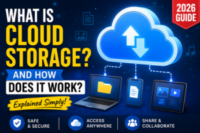
Cloud storage providers store your files on remote servers instead of your device. This allows you to:
- Access files anywhere
- Sync data across devices
- Share files online
- Create backups
If you’re unfamiliar with the basics, check out our guide on what is cloud storage to understand the technology behind these services.
Most reputable providers use:
- Data encryption
- Physical server protection
- Access controls
- Monitoring systems
But not all providers offer the same level of protection.
⚠️ Biggest Security Risks of Free Cloud Storage
Even the best free cloud storage platforms are not completely risk-free.
Here are the biggest dangers users should know about.
1. Privacy Concerns
Some free cloud providers may scan user data for:
- Advertising purposes
- Analytics
- AI training systems
This is one reason privacy-focused users prefer services like MEGA or Sync.com.
🚨 Risk:
Your personal data could be analyzed or stored longer than expected.
✅ Solution:
Always read the provider’s privacy policy before uploading sensitive files.
2. Weak Password Security
One of the biggest cloud storage risks isn’t the platform itself — it’s weak user passwords.
Hackers often gain access through:
- Reused passwords
- Simple passwords
- Phishing attacks
✅ Best Practice:
Use:
- Strong passwords
- Password managers
- Two-factor authentication (2FA)
3. Data Breaches
Even major tech companies can experience cybersecurity incidents.
A data breach could expose:
- User emails
- Login credentials
- Sensitive files
Although large providers invest heavily in security, no system is 100% immune from attacks.
4. Unsafe File Sharing
Many users accidentally expose files publicly through incorrect sharing settings.
This can lead to:
- Unauthorized access
- Leaked documents
- Privacy issues
✅ Tip:
Always double-check:
- Sharing permissions
- Public links
- Folder access settings
5. Free Services May Have Fewer Security Features
Some free plans limit:
- Advanced encryption
- File recovery
- Security monitoring
Premium plans often provide stronger protection.
This is one of the biggest arguments in the debate around Free vs Paid Cloud Storage.
Which Free Cloud Storage Services Are the Safest?
Not all platforms prioritize security equally.
Here are some of the safest free cloud storage providers available today.
MEGA – Best for Privacy
MEGA is popular because it uses:
- End-to-end encryption
- Zero-knowledge security
This means even the provider cannot easily access your files.
Best For:
- Privacy-conscious users
- Sensitive documents
- Secure file sharing
Google Drive – Best Overall Convenience
Google Drive offers:
- Strong infrastructure
- Reliable security systems
- Excellent accessibility
However, some users have privacy concerns due to Google’s data ecosystem.
Best For:
- Students
- Businesses
- Everyday users
Dropbox – Best for Collaboration
Dropbox is known for:
- Fast syncing
- Collaboration features
- Reliable performance
It’s widely trusted, although its free storage is limited.
Sync.com – Best Zero-Knowledge Security
Sync.com focuses heavily on:
- Private encryption
- Secure sharing
- User privacy
This makes it one of the safest cloud storage platforms available.
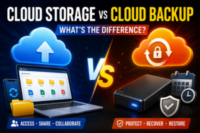
Online Backup vs Cloud Storage: What’s the Difference?
Many users confuse cloud storage with cloud backup, but they serve different purposes.
📂 Cloud Storage
Cloud storage is mainly designed for:
- File access
- Sharing
- Syncing across devices
Examples:
- Google Drive
- Dropbox
- OneDrive
💾 Cloud Backup
Cloud backup focuses on:
- Full device backups
- Disaster recovery
- Automatic restoration
Examples:
- Backblaze
- Carbonite
Understanding the differences between cloud storage and cloud backup is important because backup systems often provide stronger protection against accidental file loss.
Is Free Cloud Storage Worth It?
For most users, yes.
Free cloud storage is worth it for:
✅ Students
✅ Casual users
✅ File sharing
✅ Basic backups
But for highly sensitive business or personal data, investing in premium secure storage may be the better option.
Pro Tips to Make Free Cloud Storage Safer
Want maximum protection? Follow these expert tips.
✅ Enable Two-Factor Authentication (2FA)
This adds an extra security layer beyond passwords.
✅ Encrypt Sensitive Files Yourself
You can use tools like:
- VeraCrypt
- 7-Zip encryption
before uploading files.
✅ Avoid Suspicious Sharing Links
Never click unknown shared files without verification.
✅ Use Multiple Storage Providers
Many users combine services from our guide on Best Free Cloud Storage Options for better flexibility and backup redundancy.
✅ Keep Backups Offline Too
Cloud storage should never be your only backup solution.
Common Mistakes People Make
Avoid these common cloud security mistakes:
- Using weak passwords
- Uploading unencrypted sensitive files
- Ignoring sharing permissions
- Trusting unknown providers
- Not enabling 2FA
These errors create far bigger risks than the storage platforms themselves.
Can You Get Large Free Storage Safely?
Yes — many users combine multiple platforms to increase space safely.
If you want to maximize free storage, check out our guide on How to Get 100GB Free Cloud Storage using legitimate methods.
Expert Insight: The Real Problem Isn’t Usually the Cloud
Cybersecurity experts often point out something important:
Most cloud storage breaches happen because of:
- Human mistakes
- Poor passwords
- Phishing scams
not because the cloud service itself failed.
That means your personal security habits matter just as much as the provider you choose.
Yes, trusted providers like Google Drive and MEGA are generally safe for personal files. However, users should enable two-factor authentication and use strong passwords for maximum protection.
Hackers can target cloud accounts through phishing attacks, weak passwords, or malware. Most security breaches happen because of user mistakes rather than flaws in the cloud platform itself.
MEGA and Sync.com are considered among the safest due to strong encryption and privacy-focused features.
Cloud storage protects against physical device damage and theft, while external drives provide offline control. Using both together is usually the safest strategy.
Cloud storage focuses on syncing and accessing files online, while cloud backup is designed for full data recovery and automatic backups. Backup systems are usually better for disaster recovery.




- Be Respectful
- Stay Relevant
- Stay Positive
- True Feedback
- Encourage Discussion
- Avoid Spamming
- No Fake News
- Don't Copy-Paste
- No Personal Attacks
- Be Respectful
- Stay Relevant
- Stay Positive
- True Feedback
- Encourage Discussion
- Avoid Spamming
- No Fake News
- Don't Copy-Paste
- No Personal Attacks
