Are USB-C Cables All the Same?
Published: 22 Feb 2026
In today’s fast-paced digital world, USB-C cables have become a staple for many of our everyday devices, from smartphones to laptops, and even gaming consoles. As their popularity has soared, one question has emerged among consumers: Are USB-C cables all the same?
While USB-C cables may seem like a universal standard, they come in various types with significant differences. Choosing the right USB-C cable can make a big difference in charging speed, data transfer efficiency, and even the longevity of your devices. This article will break down the key differences between USB-C cables and help you make informed decisions when purchasing one.
What is a USB-C Cable?
USB-C, also known as USB Type-C, is the latest USB standard designed to replace older USB connectors like USB-A and USB-B. It’s a universal connector used for power, data, and video transmission. What makes USB-C stand out is its reversible design, allowing you to plug it in either way, unlike its predecessors.
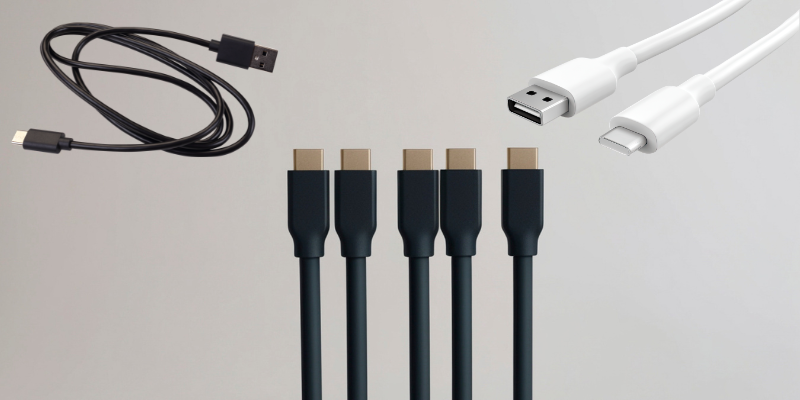
The USB-C connector has become the standard for charging and data transfer across many devices, from smartphones to laptops and even monitors. However, not all USB-C cables are created equal. Understanding the different types of USB-C cables available can help you choose the right one for your needs.
Are All USB-C Cables the Same?
No, USB-C cables are not all the same. Despite having the same basic physical connector, USB-C cables can vary widely in terms of capabilities, including charging speed, data transfer rate, and the type of power they can deliver. This variation is important to understand because using the wrong USB-C cable can lead to slower charging speeds, reduced data transfer efficiency, or even potential damage to your device.
1. Charging Speed
One of the most important differences in USB-C cables is their ability to handle varying charging speeds. While some cables can only deliver 5 watts (W) of power for basic charging, others are capable of delivering up to 100 watts for fast charging. This difference is largely due to the thickness and quality of the cable’s internal wiring. If you use a low-quality USB-C cable for fast charging, your device might charge slowly or not charge at all.
Tip: Look for cables that are specifically labeled as USB-C PD (Power Delivery) if you want faster charging, as these are designed for high-power delivery.
2. Data Transfer Rates
Not all USB-C cables support high-speed data transfer. The USB standard offers several different data transfer speeds, ranging from USB 2.0 (480 Mbps) to USB 3.2 (up to 20 Gbps). Some USB-C cables support higher transfer speeds, while others are limited to slower speeds. If you’re transferring large files or using external drives, you’ll want to ensure that your USB-C cable supports faster data transfer rates.
Tip: For fast data transfer, look for cables labeled USB 3.1 or USB 3.2. These are designed to support speeds of 5 Gbps or higher.
3. Power Delivery (PD) vs Standard Charging
USB-C Power Delivery (PD) is a fast-charging technology that allows for faster and more efficient charging compared to traditional USB chargers. USB-C cables that support PD can deliver higher power (up to 100W), which is useful for charging larger devices like laptops. Not all USB-C cables support PD, and using a cable that doesn’t support it with a PD-enabled charger will result in slower charging speeds.
Tip: Always check if the USB-C cable you are using supports Power Delivery (PD) if you need fast charging for your laptop or other power-hungry devices.
4. Video Output Capability
USB-C cables can also carry video signals, allowing you to connect your device to a monitor or TV. However, not all USB-C cables are capable of this. USB-C cables that support DisplayPort Alternate Mode (DP Alt Mode) are able to transmit video signals, allowing you to use your USB-C cable for video output.
Tip: If you plan to use your USB-C cable for connecting to a display, make sure it supports DP Alt Mode for video output.
5. Quality and Durability
The build quality of USB-C cables can vary significantly. Higher-quality cables often come with features like braided exteriors, reinforced connectors, and thicker wiring, which can increase durability. Low-quality cables may fray or break more easily, especially when used frequently.
Tip: Invest in a high-quality USB-C cable from trusted brands if you want a cable that lasts longer and can withstand daily wear and tear.
How to Choose the Right USB-C Cable
Choosing the right USB-C cable depends on your specific needs. Here are some key factors to consider when making your decision:
- Purpose: Determine if you need the cable for charging, data transfer, or video output. Some cables excel at charging but are not designed for fast data transfer or video output.
- Charging Requirements: If you need fast charging, ensure the cable supports USB-C Power Delivery (PD).
- Data Transfer: If you plan to use your USB-C cable for data transfer, choose one that supports USB 3.1 or USB 3.2 for fast speeds.
- Build Quality: For durability, consider investing in cables with reinforced connectors and braided exteriors.
- Price: While high-end cables may offer faster speeds and better durability, there are budget-friendly options that still perform well for basic needs. Make sure the cable fits your budget while meeting your requirements.
Top USB-C Cable Brands
To ensure you’re getting a quality product, it’s often best to choose a reputable brand. Here are some of the top USB-C cable brands known for their quality and performance:
- Anker
- Aukey
- Belkin
- UGREEN
- Nomad
These brands are known for producing durable and high-performance USB-C cables, making them a good choice for anyone looking to ensure compatibility and reliability.
Conclusion
So, are USB-C cables all the same? The answer is no. There are different types of USB-C cables with varying capabilities. From charging speed to data transfer rates and video output, the performance of USB-C cables can differ significantly. It’s crucial to choose the right cable for your needs to ensure optimal performance.
Whether you’re looking for fast charging, high-speed data transfer, or video output, there’s a USB-C cable that fits your requirements. Don’t forget to consider factors like build quality and durability, as well as reputable brands, when making your purchase.
To learn more about tech products and find comparisons of the latest gadgets, check out our [Top Gadget Comparisons] for in-depth reviews and buying guides!
No, USB-C cables vary in terms of charging speed, data transfer rates, power delivery, and video output capabilities. It’s important to choose the right cable based on your specific needs, such as fast charging, data transfer, or video connections.
USB-C is a newer connector that is reversible, supports faster data transfer, and can handle more power. USB-A is the older, non-reversible connector commonly found on most older devices, while USB-C is now the standard for most modern devices.
To ensure your USB-C cable supports fast charging, look for cables labeled USB-C Power Delivery (PD). These cables can deliver up to 100 watts of power, which is necessary for fast charging laptops, smartphones, and other power-hungry devices.
The main difference lies in data transfer speeds. USB 2.0 supports up to 480 Mbps, USB 3.1 offers speeds up to 5 Gbps, and USB 3.2 can support data transfer rates of up to 20 Gbps. Higher versions are more suitable for fast data transfer, such as for external hard drives and large file transfers.
Not all USB-C cables support video output. If you need to use your USB-C cable for connecting to monitors or TVs, ensure the cable supports DisplayPort Alternate Mode (DP Alt Mode). This mode enables video transmission through the USB-C port.
To increase the lifespan of your USB-C cable, choose high-quality cables with reinforced connectors and braided exteriors. Also, avoid frequent bending and excessive tugging, as this can cause wear and tear.
If you’re using your USB-C cable for gaming, ensure it supports USB 3.1 or USB 3.2 for faster data transfer speeds. Additionally, cables with Power Delivery (PD) will be essential for charging your device quickly during extended gaming sessions.





- Be Respectful
- Stay Relevant
- Stay Positive
- True Feedback
- Encourage Discussion
- Avoid Spamming
- No Fake News
- Don't Copy-Paste
- No Personal Attacks
- Be Respectful
- Stay Relevant
- Stay Positive
- True Feedback
- Encourage Discussion
- Avoid Spamming
- No Fake News
- Don't Copy-Paste
- No Personal Attacks
